> For the complete documentation index, see [llms.txt](https://guide-en.dbotx.com/llms.txt). Markdown versions of documentation pages are available by appending `.md` to page URLs; this page is available as [Markdown](https://guide-en.dbotx.com/telegram-bot/telegram-bot-for-personal/limit-order.md).
# Limit Order
{% hint style="info" %}
### **DBot TG Bot supports Auto Limit Order**
{% endhint %}
Click on Limit Order on the homepage, or enter the /limitorder to create and manage limit orders
* Limit orders can be filtered by token
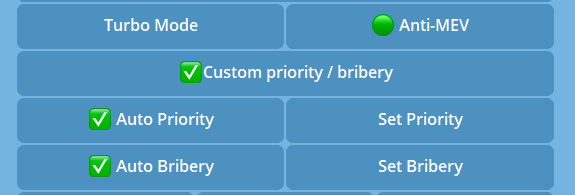
* **Customized priority fee and bribery tip for Solana's transactions supported**
When checked, you can customize the priority fee and bribery tip for turbo mode / anti-MEV, otherwise it will be auto assigned by the system
{% hint style="info" %}
### **DBot TG Bot supports auto execute limit orders when expired**
{% endhint %}
* **Auto Buy:** Auto buy if the task expires without being triggered
`After enabled, if the task is not triggered within the expiry period, it will be executed automatically when the expiry period ends`
* **Auto Sell:** Auto sell if the task expires without being triggered
`After enabled, if the task is not triggered within the expiry period, it will be executed automatically when the expiry period ends`
* **Customized priority fee and bribery tip for Solana's transactions supported**
When checked, you can customize the priority fee and bribery tip for turbo mode / anti-MEV, otherwise it will be auto assigned by the system
{% hint style="info" %}
### **DBot TG Bot supports** creating limit orders by market cap & price change
{% endhint %}
**`Please enter the trigger price ($), which can be the price, the price change, or the market cap`**
`● When entering the percentage change, the symbol % must be included, e.g. 5% or -5%`
`● When entering the market cap, the symbol mc must be included at the beginning, and the number with the suffix k/m/b can be entered, e.g. mc 5000000 or mc 5m`
`Current price: $0.0001786`
`Current market cap: $178.68k`
{% hint style="info" %}
### **DBot TG Bot supports** Anti Spike for trading
{% endhint %}
**Anti Spike:** When enabled, use the 1-second mid-price as trigger price with Anti-Spike Mechanism (not 100% guaranteed)