> For the complete documentation index, see [llms.txt](https://guide-en.dbotx.com/llms.txt). Markdown versions of documentation pages are available by appending `.md` to page URLs; this page is available as [Markdown](https://guide-en.dbotx.com/telegram-bot/telegram-bot-alert/multi-wallet-monitoring.md).
# Multi-Wallet Monitoring
{% hint style="info" %}
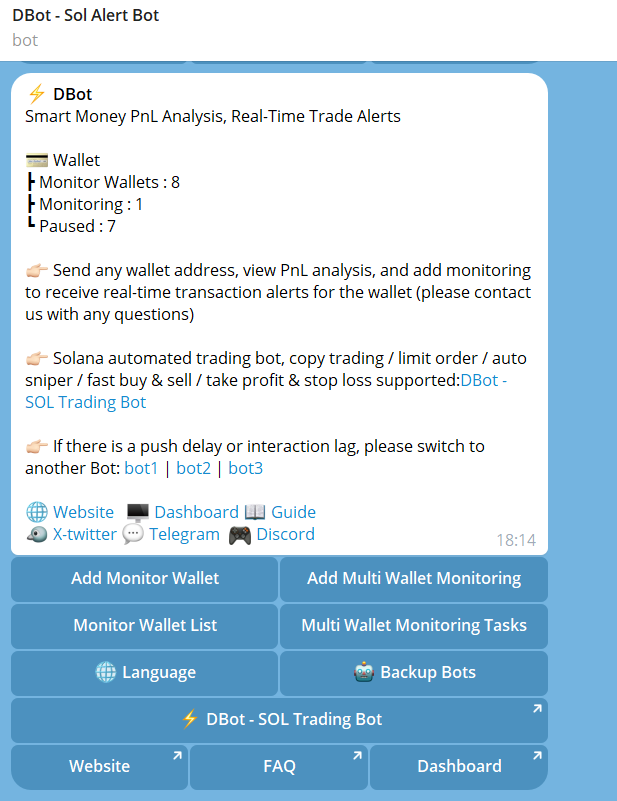
1. **After binding your personal Telegram** in [**DBot-Dashboard-Telegram Bot (Alert)**](https://dbotx.com/dashboard/telegram_monitor) , you can receive real-time trading alerts in Telegram
* Please search for "[**@sol\_alert\_dbot**](< https://t.me/sol_alert_dbot>)" in Telegram, or click this link:[ https://t.me/sol\_alert\_dbot](< https://t.me/sol_alert_dbot>)
If there is a push delay or interaction lag, please switch to another Bot: [Backup Bot1](https://t.me/sol2_alert_dbot) | [Backup Bot2](https://t.me/sol3_alert_dbot) | [Backup Bot3](https://t.me/sol4_alert_dbot) | [Backup Bot4](https://t.me/sol5_alert_dbot)
USDC trading pair for Solana Alert Bot supported
{% endhint %}
{% hint style="info" %}
2\. **Click: Add Multi-Wallet Monitoring, enter smart wallet address, set and save multi-wallet monitoring task Multi-wallet monitoring single task can monitor 30 addresses, and now supports setting 5 Multi-Wallet Monitoring tasks** (customizable names, support smart money profit and loss/position analysis)
Adding Monitor Wallet in the Dashboard or TG Alet bot will both work.
{% endhint %}
{% hint style="info" %}
**Task Name (Optional)**
**Wallet Address:** Up to 30 addresses can be monitored, if wallets with too many transactions and may be bots are added, they will be auto excluded when creating / editing task
**Buy Wallets:** The push will be triggered only when this number or more wallets buy the same token within the specified time
**Buy Time Limit:** The push will be triggered only when multiple wallets buy the same token within this time frame
**Buy Range (Optional):** The buy amount must fall within this range to be considered valid
**Push Frenquency:**
No Restriction: Within the time limit, a notification will be sent each time a new wallet buys / sells the same token
**Once Per Token(24H):** The same token is only pushed once in 24 hours
**Sell Wallets:** The push will be triggered only when this number or more wallets sell the same token within the specified time
**Sell Time Limit:** The push will be triggered only when multiple wallets sell the same token within this time frame
**Sell Range(Optional):** The sell income must fall within this range to be considered valid
{% endhint %}
* To add wallets to the multi-wallet monitoring task, you need to add them one by one (adding multiple wallets in one message is not supported yet). After adding, click: Next
* After setting the corresponding monitoring conditions, confirm and submit (If wallets with too many transactions and may be bots are added, they will be auto excluded when creating / editing task)
{% hint style="info" %}
3\. **Click: Multi-Wallet Monitoring list to turn monitoring on or off, and support clicking on any address to view and edit. Batch operations for multi-wallet monitoring supported.**
{% endhint %}
{% hint style="info" %}
4\. **After binding your personal Telegram and adding Monitor Wallet , your personal Telegram will receive: real-time push messages of smart money buy/sell transactions** (supports one-click to DBot SOL trading bot for fast buy/sell)
{% endhint %}