> For the complete documentation index, see [llms.txt](https://guide-en.dbotx.com/llms.txt). Markdown versions of documentation pages are available by appending `.md` to page URLs; this page is available as [Markdown](https://guide-en.dbotx.com/dex-trading-bot/parallel-account.md).
# Parallel Account
Parallel accounts can improve trading speed and success rate
#### What is Parallel Account?
Parallel Account executes trades using a **Nonce-based mechanism**, allowing you to submit the same transaction to multiple RPC providers at once.\
As soon as one provider successfully sends the transaction on-chain, the others automatically fail — ensuring you don’t waste priority fees.\
*This feature is Solana-only. We recommend creating a sniping account for faster and more reliable trading.*
***
#### Advantages:
* **Faster Execution**: Always routes through the fastest RPC provider available.
* **Higher Stability**: Sends to multiple providers simultaneously, reducing the risk of failed transactions.
***
#### Notes:
1. A sniping account is a **special Solana account** that requires rent (usually less than **0.002 SOL**). If you no longer need it, you can close the account and reclaim the rent.
2. Sniping accounts **cannot process concurrent transactions** — only one trade can be handled at a time.
* If your wallet is copy-trading multiple tasks or handling several transactions simultaneously, we recommend creating **3 or more parallel accounts** for smooth operation.
***
#### How to Set Up:
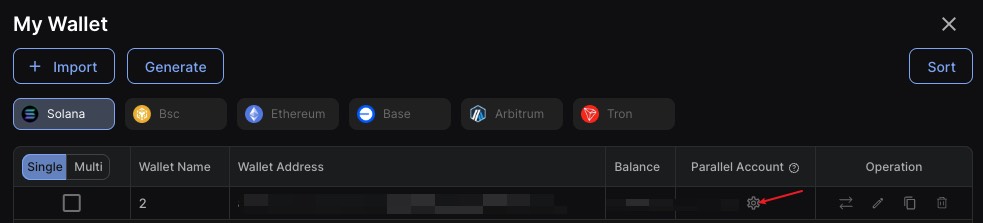
1. In the **DBot Dashboard - My Wallet Page**:
* When selecting a wallet for copy trading, fast buy/sell, etc. tradings, you’ll see an option to configure parallel accounts.
* From here, you can create or close parallel accounts.
* Once created, the wallet’s trades in **Turbo Mode** (when priority fee + bribery tip >0.0002 sol) will use the parallel account without extra priority fee or bribery tip.
2. Creating parallel accounts during wallet import supported
3. **In Telegram Bot – Wallets Page:**\
On the wallet list page, you will find a counter showing the number of parallel accounts under each wallet, along with a button to create new ones.